
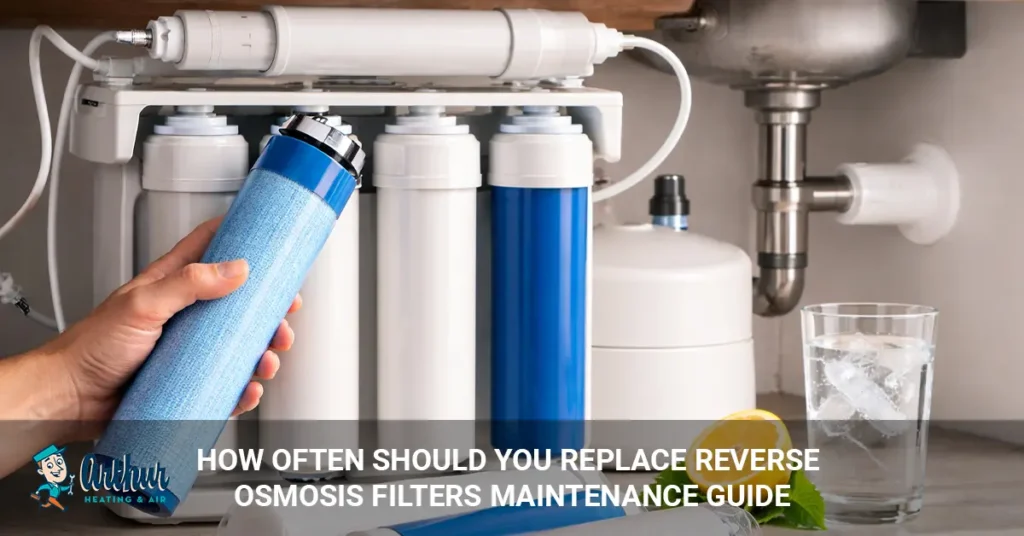
Most reverse osmosis (RO) filters should be replaced every 6 to 12 months, while the RO membrane typically lasts 2 to 3 years. Replacing filters on schedule is one of the most important maintenance tasks for keeping your reverse osmosis system producing clean, great-tasting drinking water. Waiting too long to replace worn filters can reduce water quality, decrease water flow, and even shorten the lifespan of the RO membrane.
The exact replacement schedule depends on several factors, including your water quality, household size, daily water usage, and the type of reverse osmosis system you own. Homes with hard water, well water, or high sediment levels often need more frequent filter replacements than homes with treated municipal water.
In this guide, you’ll learn how often each reverse osmosis filter should be replaced, what affects filter lifespan, the warning signs that it’s time for new filters, maintenance tips to keep your system operating efficiently, and how much replacement filters typically cost.
How Often Should You Replace Reverse Osmosis Filters?
Most reverse osmosis filters should be replaced every 6 to 12 months, while the RO membrane generally lasts 2 to 3 years. However, the ideal replacement schedule depends on your water quality, household water usage, and the manufacturer’s recommendations. Replacing filters before they become clogged helps maintain water quality, protects the membrane, and keeps the system operating efficiently.
The table below shows the recommended replacement intervals for the most common reverse osmosis filters.
| Filter Type | Recommended Replacement |
| Sediment Filter | Every 6–12 months |
| Carbon Pre-Filter | Every 6–12 months |
| Reverse Osmosis Membrane | Every 2–3 years |
| Post-Carbon Filter | Every 12 months |
These are general guidelines. If your home has hard water, well water, or high sediment levels, some filters may need to be replaced sooner. Likewise, larger households that use more filtered water often reach the replacement interval faster than smaller households.
Replacing filters on schedule provides several benefits:
- Maintains clean, fresh-tasting drinking water
- Protects the RO membrane from premature wear
- Improves water flow
- Reduces contaminants effectively
- Extends the lifespan of the entire reverse osmosis system
Waiting until water quality noticeably declines isn’t recommended. By the time you notice changes in taste, odor, or water pressure, the filters may already be restricting system performance and placing additional strain on the RO membrane.
Reverse Osmosis Filter Replacement Schedule
Each filter in a reverse osmosis system has a different job and lifespan. Replacing every filter at the recommended interval helps maintain water quality, protects the RO membrane, and keeps the entire system operating efficiently.
Sediment Filter
Replace the sediment filter every 6 to 12 months. This filter captures sand, dirt, rust, silt, and other large particles before they reach the carbon filter and RO membrane.
If the sediment filter becomes clogged, it can:
- Reduce water pressure
- Slow water production
- Cause premature wear on downstream filters
- Shorten the life of the RO membrane
Homes with well water or high sediment levels may need to replace this filter more frequently.
Carbon Pre-Filter
Replace the carbon pre-filter every 6 to 12 months. This filter removes chlorine, chloramine (if designed for it), unpleasant tastes, odors, and certain chemicals before water reaches the RO membrane.
Replacing the carbon filter on time is especially important because chlorine can damage the RO membrane over time.
Reverse Osmosis Membrane
Replace the RO membrane every 2 to 3 years. The membrane is the heart of the reverse osmosis system, removing dissolved contaminants such as lead, arsenic, fluoride, nitrates, and many other impurities.
A well-maintained membrane can sometimes last longer, but factors such as hard water, heavy water usage, and neglected pre-filters can significantly reduce its lifespan.
Post-Carbon Filter
Replace the post-carbon filter every 12 months. Also called the polishing filter, it improves the taste and odor of the water after it passes through the RO membrane and before it reaches your faucet.
Although it doesn’t protect the membrane, replacing it annually helps maintain fresh-tasting drinking water.
Remineralization Filter (If Installed)
Most remineralization filters should be replaced every 12 to 18 months. These filters add beneficial minerals such as calcium and magnesium back into the purified water to improve taste and balance the water’s pH.
Always follow the replacement interval recommended by your system’s manufacturer.
UV Filter (If Installed)
UV lamps typically require replacement every 12 months, even if the light is still working. Over time, the UV lamp’s ability to disinfect water decreases, reducing its effectiveness against bacteria, viruses, and other microorganisms.
If your reverse osmosis system includes UV treatment, annual lamp replacement is essential for continued protection.
Following the correct replacement schedule for each component helps ensure your reverse osmosis system continues producing clean, safe, and great-tasting water while maximizing the lifespan of expensive components like the RO membrane.
What Affects How Often You Replace RO Filters?
Several factors determine how quickly reverse osmosis filters wear out. While manufacturers provide general replacement schedules, your home’s water quality, daily water usage, and the type of filtration system you have can shorten or extend filter life.
Water Quality
The quality of your incoming water has the biggest impact on filter lifespan. Water with high levels of sediment, chlorine, iron, manganese, or other contaminants forces the filters to work harder, causing them to clog or lose effectiveness sooner.
If your home’s water quality is affecting multiple plumbing appliances, you may also want to understand water heater installation and replacement considerations when upgrading your home’s water system.
If your water contains:
- High sediment
- Hard minerals
- Chlorine
- Iron or rust
- Organic matter
You may need to replace filters more frequently than the standard schedule.
Household Size
Larger households typically replace RO filters more often than smaller households. More people means more drinking, cooking, and ice-making, increasing the amount of water passing through the system each day.
For example:
- 1–2 people: Filters may last closer to the maximum recommended interval.
- 3–5 people: Follow the standard replacement schedule.
- 6+ people: Some filters may require earlier replacement due to heavier water use.
Daily Water Usage
The more filtered water your family uses, the faster the filters wear out. Homes that rely on reverse osmosis water for drinking, cooking, coffee makers, refrigerators, and ice makers generally reach replacement intervals sooner than homes that use the system only occasionally.
Well Water vs. Municipal Water
Well water often requires more frequent filter changes than municipal water. Unlike treated city water, well water may contain higher concentrations of sediment, minerals, bacteria, iron, sulfur, or other naturally occurring contaminants.
Municipal water, on the other hand, usually contains chlorine or chloramine, making timely carbon filter replacement especially important to protect the RO membrane.
Manufacturer Recommendations
Always follow the maintenance schedule provided by your reverse osmosis system manufacturer. Different systems use different filter sizes, membrane capacities, and filtration stages, so replacement intervals may vary slightly between brands.
Following the manufacturer’s recommendations helps:
- Maintain water quality
- Protect the RO membrane
- Preserve warranty coverage
- Maximize system lifespan
Even if your system appears to be working normally, replacing filters according to the recommended schedule is the best way to ensure consistent performance and avoid unnecessary wear on expensive components.
Signs Your Reverse Osmosis Filters Need Replacing
Reverse osmosis filters usually show warning signs before they stop working effectively. Recognizing these symptoms early helps maintain water quality, protects the RO membrane, and prevents unnecessary strain on the entire filtration system.
Slow Water Flow
Reduced water flow is one of the most common signs of a clogged filter. As sediment and contaminants build up inside the filters, water passes through more slowly, resulting in lower flow from the RO faucet.
If your storage tank is full but water still flows slowly, one or more filters may need replacement.
Bad Taste or Odor
A change in the taste or smell of your drinking water often indicates a worn carbon filter or post-carbon filter. If your water begins tasting like chlorine, has an unpleasant odor, or no longer tastes as fresh as it once did, the filters may no longer be removing contaminants effectively.
Cloudy Water
Cloudy or discolored water can indicate that your filtration system isn’t performing properly. While tiny air bubbles sometimes cause temporary cloudiness, persistent changes in water clarity should be investigated.
Possible causes include:
- Worn filters
- Membrane deterioration
- High sediment levels
- System contamination
Lower Water Pressure
A noticeable drop in water pressure may indicate clogged filters. Sediment filters and carbon filters gradually fill with debris, restricting water flow throughout the system.
Replacing clogged filters often restores normal pressure.
Higher TDS Reading
An increasing Total Dissolved Solids (TDS) reading may indicate the RO membrane is losing efficiency. Many homeowners use a handheld TDS meter to monitor system performance.
If TDS levels begin rising significantly compared to previous readings, it may be time to replace the membrane or inspect the filtration system.
Strange Noises From the System
Unusual sounds can also signal maintenance is needed. Gurgling, hissing, continuous draining, or frequent cycling may indicate clogged filters, low water pressure, or another issue affecting the reverse osmosis system.
If replacing the filters doesn’t eliminate the noise, the system should be inspected by a qualified technician.
Don’t wait until water quality declines dramatically before replacing your filters. Following the recommended maintenance schedule and watching for these warning signs helps ensure your reverse osmosis system continues producing clean, safe, and great-tasting drinking water.
What Happens If You Don’t Replace RO Filters?
Failing to replace reverse osmosis filters on schedule can reduce water quality, damage the RO membrane, and shorten the lifespan of the entire system. While the system may continue producing water for a time, worn filters become less effective at removing contaminants and protecting downstream components.
Reduced Filtration Performance
Old filters lose their ability to remove sediment, chlorine, chemicals, and other contaminants effectively. As a result, more impurities may pass through the system, reducing the quality and taste of your drinking water.
Premature RO Membrane Damage
Neglected pre-filters can significantly shorten the life of the RO membrane. A clogged sediment filter allows dirt and debris to reach the membrane, while an exhausted carbon filter may no longer remove chlorine that can damage certain RO membranes.
Since the membrane is one of the most expensive components, protecting it with regular filter changes can save money over time.
Poor Water Taste and Odor
Worn carbon filters often allow unpleasant tastes and odors to return. You may notice:
- Chlorine taste
- Metallic flavor
- Musty odor
- Stale-tasting water
Replacing the filters usually restores clean, fresh-tasting drinking water.
Bacteria and Biofilm Buildup
Dirty filters can encourage bacteria and biofilm growth inside the filtration system. While reverse osmosis systems are designed to improve water quality, neglected maintenance can allow microorganisms to accumulate on old filter media and inside filter housings.
Regular filter replacement and periodic system sanitization help reduce this risk.
Reduced Water Production
Clogged filters restrict water flow and reduce the amount of purified water your system can produce. You may notice:
- Slower faucet flow
- Longer tank refill times
- Lower water pressure
- Reduced daily water output
These symptoms often improve after replacing the affected filters.
Shorter System Lifespan
Ignoring routine maintenance can shorten the lifespan of the entire reverse osmosis system. Components such as the membrane, automatic shutoff valve, storage tank, and fittings may experience additional wear when the system operates with clogged filters.
Replacing inexpensive filters on schedule is far more cost-effective than replacing an RO membrane or installing a new reverse osmosis system.
Routine maintenance not only keeps your drinking water clean but also protects your investment by helping every component of the system perform as designed.
Can You Replace Reverse Osmosis Filters Yourself?
Yes, most reverse osmosis filters are designed for DIY replacement, and many homeowners can complete the job in less than an hour. Most modern RO systems use twist-lock or quick-connect filter cartridges that don’t require special plumbing tools. Following the manufacturer’s instructions helps ensure the new filters are installed correctly and the system continues operating efficiently.
Shut Off the Water Supply
Before replacing any filters, turn off the water supply to the reverse osmosis system. Also close the storage tank valve and relieve pressure by opening the RO faucet until the water flow stops.
This helps prevent leaks and makes the filter replacement process easier.
Replace the Filter Cartridges
Remove the old filters and install the new cartridges according to the manufacturer’s instructions. If your system uses filter housings, inspect the O-rings for damage and lubricate them with food-grade silicone lubricant if recommended.
Make sure each filter is installed in the correct stage of the filtration system.
Sanitize the Filter Housings
Cleaning the filter housings during replacement helps prevent bacteria and biofilm buildup. Before installing the new filters:
- Wash the housings with warm water.
- Sanitize them using a manufacturer-approved sanitizing solution.
- Rinse thoroughly before reassembly.
Annual sanitization helps maintain water quality and keeps the system operating hygienically.
Turn the Water Back On
Slowly restore the water supply after installing the new filters. Open the feed water valve first, then the storage tank valve, and inspect every connection for leaks.
Allow the system to pressurize before using it normally.
Flush the System
New filters should always be flushed before drinking the water. Flushing removes loose carbon fines, trapped air, and manufacturing residue that may temporarily affect water taste or appearance.
The exact flushing procedure varies by manufacturer, but many systems require:
- Filling the storage tank completely.
- Draining the tank once or twice.
- Repeating the process if recommended in the owner’s manual.
Not Sure Which Filters To Use or How To Install Them?
Let a professional handle it quickly and correctly.
 Book RO Filter Replacement Service
When Should You Call a Professional?
Professional service may be the better choice if your reverse osmosis system has persistent performance problems or requires more than routine filter replacement.
Consider calling a professional if:
- The system continues leaking after replacing filters.
- Water production remains very low.
- The TDS reading stays high after installing new filters.
- The RO membrane or automatic shutoff valve needs replacement.
- You’re unsure how to service your specific model.
For most homeowners, replacing sediment, carbon, and post-carbon filters is a simple maintenance task that helps keep the reverse osmosis system producing clean, great-tasting water while extending the life of the membrane and other components.
How to Maintain a Reverse Osmosis System
Regular maintenance helps your reverse osmosis system produce clean, great-tasting water while extending the life of the filters and membrane. In addition to replacing filters on schedule, a few simple maintenance tasks can improve performance and reduce the likelihood of costly repairs.
Replace Filters on Schedule
The most important maintenance task is replacing each filter at the recommended interval. Fresh filters protect the RO membrane, maintain water quality, and help the system operate efficiently.
As a general guideline:
- Sediment filter: Every 6–12 months
- Carbon pre-filter: Every 6–12 months
- Post-carbon filter: Every 12 months
- RO membrane: Every 2–3 years
Always follow the maintenance schedule recommended by your system’s manufacturer.
Sanitize the System Annually
Sanitizing the reverse osmosis system at least once a year helps reduce bacteria and biofilm buildup. Many manufacturers recommend sanitizing the filter housings whenever the filters are replaced or at least during annual maintenance.
Keeping the system clean helps maintain water quality and supports long-term performance.
Check for Leaks
Inspect your reverse osmosis system regularly for signs of leaks. Examine:
- Filter housings
- Tubing connections
- Storage tank fittings
- Faucet connections
- Shut-off valves
Even a small leak can waste water and eventually damage cabinets or flooring if left unattended.
Test Total Dissolved Solids (TDS)
Using a TDS meter helps monitor your system’s performance. A rising TDS reading doesn’t always mean the filters need replacing, but it can indicate that the RO membrane is becoming less effective or that maintenance is overdue.
Periodic testing provides an easy way to monitor water quality between scheduled filter changes.
Inspect Tubing and Fittings
Check all tubing and fittings for wear, cracks, or loose connections. Plastic tubing can become brittle over time, especially in older systems.
Replacing worn components early helps prevent leaks and unexpected system failures.
Keep a Maintenance Record
Recording filter changes and maintenance dates makes it easier to stay on schedule. Many homeowners place a label inside the sink cabinet or use a calendar reminder to track:
- Filter replacement dates
- Membrane replacement
- System sanitization
- TDS test results
- Service visits
A simple maintenance record helps ensure no filter is accidentally left in service beyond its recommended lifespan.
Routine maintenance requires only a small investment of time but can significantly improve your reverse osmosis system’s reliability. Replacing filters on schedule, inspecting the system regularly, and monitoring water quality help ensure your household continues to receive clean, safe drinking water for years to come.
Reverse Osmosis Filter Replacement Cost
Replacing reverse osmosis filters is an affordable part of routine system maintenance. The total cost depends on the type of filter, the brand of your reverse osmosis system, and whether you replace the filters yourself or hire a professional.
The table below shows typical replacement costs.
| Component | Typical Cost |
| Sediment Filter | $10–$30 |
| Carbon Pre-Filter | $15–$40 |
| Post-Carbon Filter | $15–$40 |
| RO Membrane | $40–$120 |
| Complete Filter Replacement Kit | $50–$200 |
| Professional Filter Replacement | $100–$300 |
Sediment Filter Cost
Sediment filters are usually the least expensive component to replace. These filters protect the rest of the system by trapping dirt, sand, rust, and other large particles before they reach the carbon filter and RO membrane.
Most sediment filters cost between $10 and $30.
Carbon Filter Cost
Carbon filters typically cost between $15 and $40 each. They remove chlorine, unpleasant tastes, odors, and certain chemicals that can damage the RO membrane if left untreated.
The exact price depends on the filter size and manufacturer.
Reverse Osmosis Membrane Cost
The RO membrane is the most expensive filter in the system, but it also lasts the longest. Most residential replacement membranes cost $40 to $120 and only need replacement every two to three years under normal operating conditions.
Replacing pre-filters on schedule helps maximize membrane life.
Complete Filter Replacement Kit
Many manufacturers sell complete filter replacement kits that include all of the annual filters. Purchasing a kit is often more economical than buying each filter separately and ensures you receive compatible replacement cartridges.
Complete filter kits generally cost between $50 and $200, depending on the system.
Professional Replacement Cost
Hiring a professional to replace reverse osmosis filters typically costs $100 to $300, including labor and standard replacement filters. Professional service may be worthwhile if your system requires sanitization, membrane replacement, leak repairs, or additional maintenance during the visit.
Although professional service adds to the upfront cost, regular filter replacement is still far less expensive than repairing a neglected reverse osmosis system or replacing a damaged RO membrane. Routine maintenance helps protect your investment while ensuring consistent water quality.
Frequently Asked Questions
Can I wait longer to replace reverse osmosis filters?
It’s not recommended to delay filter replacement beyond the manufacturer’s schedule. Worn filters become less effective at removing contaminants and can reduce water flow, affect taste, and place extra strain on the RO membrane. Replacing filters on time helps maintain both water quality and system performance.
How do I know my RO membrane is bad?
A failing RO membrane often causes a noticeable increase in Total Dissolved Solids (TDS), slower water production, and poorer water taste. If your pre-filters are new but water quality continues to decline, the membrane may need replacement.
Can dirty filters damage the RO membrane?
Yes. Dirty sediment and carbon filters can shorten the lifespan of the RO membrane. A clogged sediment filter allows debris to reach the membrane, while an exhausted carbon filter may no longer remove chlorine, which can damage certain membrane materials over time.
Do all reverse osmosis systems have the same replacement schedule?
No. Replacement intervals vary by manufacturer, filter size, water quality, and system design. While most sediment and carbon filters last 6 to 12 months and membranes last 2 to 3 years, always follow the maintenance recommendations for your specific RO system.
Should I replace all filters at the same time?
Not always. Sediment, carbon, and post-carbon filters are often replaced together during annual maintenance, but the RO membrane usually lasts much longer. Replacing only the filters that have reached the end of their service life is typically the most cost-effective approach.
How long does a reverse osmosis system last?
A well-maintained reverse osmosis system can last 10 to 15 years or longer. Regular filter replacement, annual sanitization, prompt leak repairs, and proper maintenance help maximize the lifespan of the system.
Is professional maintenance necessary?
Professional maintenance isn’t required for routine filter changes, but it can be beneficial in some situations. Most homeowners can replace standard filters themselves. However, professional service is recommended if:
- The system continues leaking.
- Water production remains low after replacing filters.
- TDS readings stay high.
- The RO membrane or internal components need replacement.
- You’re unsure how to service your specific system.
Final Thoughts
Replacing reverse osmosis filters on schedule is essential for maintaining clean, safe, and great-tasting drinking water. Sediment and carbon filters typically need replacement every 6 to 12 months, while the RO membrane usually lasts 2 to 3 years. Following the recommended maintenance schedule helps protect the membrane, improve water flow, and extend the lifespan of your reverse osmosis system.
Don’t wait until you notice poor water quality or reduced performance. Routine filter replacement, annual system sanitization, and regular inspections can help prevent costly repairs while ensuring your reverse osmosis system continues to deliver reliable, high-quality drinking water for years to come. Just like any home appliance, following a regular maintenance schedule helps maximize the lifespan of your home’s essential systems.
Never Miss a Filter Change Again
Schedule annual RO maintenance to keep your water clean year-round.
 Set Up My Maintenance Plan